Clapping cat AI prompt: the one we use
Updated · Clapping Cat AI
Start from your pet's photo as the first frame and describe three shots: the photo held still for half a second, a hard cut to the pet standing up with a wide human-toothed grin, then a close-up of small human hands with five fingers clapping slowly. Two details matter most: name the human hands and their five fingers, or the pet just claps its paws; and say nothing is in the foreground, or a phone tends to appear. The full prompt we use is below.
Make your own clapping cat video from one photo
Clapping Cat: a real result
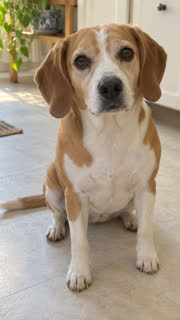 The photo
The prompt
Use it with your pet's photo as the first frame (image-to-video), 10 seconds, vertical 9:16:
"A 10-second edit. Shot 1, about half a second: the original photo itself, held still. Then a hard cut to Shot 2: the same pet in the same room, camera at the pet's eye level. The pet rises and stands upright on its two hind legs like a person, and its mouth slowly stretches into a wide, unsettling human-like grin that shows a full row of white human teeth. Shot 3, medium close-up: the pet's front paws have become small, pale human hands with five slender fingers and human fingernails, attached to its furry forearms. It brings the two human hands together in front of its chest and claps slowly and deliberately, again and again, while holding the eerie grin and staring straight into the lens. Deadpan, uncanny and funny like the viral AI clapping cat meme. Photoreal fur, same eyes, coat and markings as in the photo, static camera, nothing in the foreground. Only this pet appears; no people, no phones and no other animals. Keep the face, fur color and markings of the pet exactly as in the opening photo in every shot. Smooth realistic motion. Audio: slow, crisp hand claps echoing in a quiet room, no music, no vocals."
Why each part is there
- "Shot 1 ... the original photo itself": the video opens on your real photo, so people see it's your pet before the joke.
- "small, pale human hands with five slender fingers": without the fingers, the model usually animates the paws clapping, which just looks like a normal pet video.
- "nothing in the foreground ... no phones": in our tests a phone showed up in the low shot without it.
- "Keep the face, fur color and markings": keeps your pet recognizable after the cut.
- "static camera" and "staring straight into the lens": the meme works because the cat stares at you while it claps.
Settings
- Image-to-video with your photo as the first frame, not text-to-video.
- 10 seconds, vertical 9:16, 720p or higher.
- Sound on, if the app makes audio.
- We run it on ByteDance Seedance 2.0. Other models may need several tries to get the hands right.
Or skip the prompt work
If you'd rather not test prompts and pay for retries, upload your pet's photo here: the same prompt and settings, one video for $5.90, ready in 2 to 5 minutes, with a full refund within 7 days if you're not happy with the first one.
Related
- Clapping Cat AI generator
- How to make your cat clap like the clapping cat meme
- What is the clapping cat meme?
- Can you make your dog clap like the clapping cat?
- Ways to make your own clapping cat video, compared
- Will the clapping cat AI look like my cat?
- Is there a free clapping cat AI generator?
- How to do the clapping cat trend on CapCut
- Make your black cat the clapping cat
- How to post your clapping cat video on TikTok
- How to make a clapping cat GIF