How to make a clapping cat GIF
Updated · Clapping Cat AI
For the original black cat, search "black cat clapping" on GIPHY or Tenor, or from the GIF button in most keyboards and chat apps. For a GIF of your own pet, make the clapping cat video first, then cut the few seconds of clapping into a GIF with a free converter such as ezgif or GIPHY's GIF maker. A GIF has no sound, so pick a moment that works silently.
Make your own clapping cat video from one photo
Clapping Cat: a real result
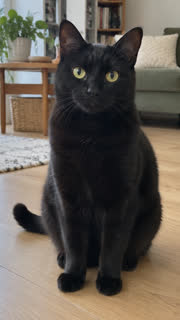 The photo
The original clapping cat GIF
The original grinning, clapping black cat is on GIPHY and Tenor under searches like "black cat clapping" and "clapping cat meme", including a green-screen version. Most phone keyboards and chat apps search the same libraries from their GIF button, so you can send it without leaving the chat.
Make a GIF of your own pet
- Make your clapping cat video from one photo of your cat or dog and download the MP4.
- Open a video-to-GIF converter. ezgif's Video to GIF works in any browser, takes files up to 200 MB and deletes uploads after an hour; GIPHY's GIF maker also takes MP4 files.
- Set the start and end to the clapping close-up in the second half of the video.
- Keep it to 3 or 4 seconds and around 480 pixels wide, so it stays small enough to send.
- Download the GIF and send it, or upload it to GIPHY so you can search for it later.
GIF or video?
- GIF: loops silently and works in chats, comments and slides.
- Video: keeps the clapping sound and looks sharper, so use it for TikTok, Reels and Shorts.
Reaction GIF ideas
- "Wow. Groundbreaking." when someone states the obvious.
- "Congrats on the bare minimum" for a friend who finally replied.
- A slow clap for whoever booked the 8am meeting.
Related
- Clapping Cat AI generator
- How to make your cat clap like the clapping cat meme
- What is the clapping cat meme?
- Can you make your dog clap like the clapping cat?
- Ways to make your own clapping cat video, compared
- Will the clapping cat AI look like my cat?
- Is there a free clapping cat AI generator?
- How to do the clapping cat trend on CapCut
- Make your black cat the clapping cat
- How to post your clapping cat video on TikTok
- Clapping cat AI prompt: the one we use